Your remote team, on one floor.
A virtual office in the browser. See who's in, walk over to talk, and get back to work. Nothing to schedule, nothing to install.
One price for the whole team · No card needed
Trusted by startups, agencies and studios worldwide
Teams are working on TinyFloor in
- Ecuador
- Pilipinas
- भारत
- Honduras
- Brasil
- Canada
- Indonesia
- United States
- مصر
- Colombia
- Deutschland
- Panamá
- Portugal
- España
- México
- Türkiye
- Κύπρος
- 대한민국
- Nederland
A virtual office for remote teams, where talking doesn’t need a meeting.
Know who’s around before you ask.
Your whole remote team on one floor, each at a desk with a status. See who’s free, who’s heads down and who’s in a meeting at a glance, without status meetings or “are you there?” messages.
On the floor5
- EmmaFree to talkWave
- JackIn the meeting room
- OliviaHeads down until 3
- SamPairing with Noah
- NoahPairing with Sam
Away1
- LilyBack on Monday

A virtual meeting room, down the hall.
When three or more of you need to talk, meet in the meeting room, with HD video, screen sharing and a whiteboard on the wall. Walk in to join and walk out to leave. No links to send, nothing to schedule.


Team chat, right beside the floor.
Channels and direct messages for everything that isn’t a call, so what was decided is written down and easy to find. Reply to a message, react, and share a screenshot.
More about team chat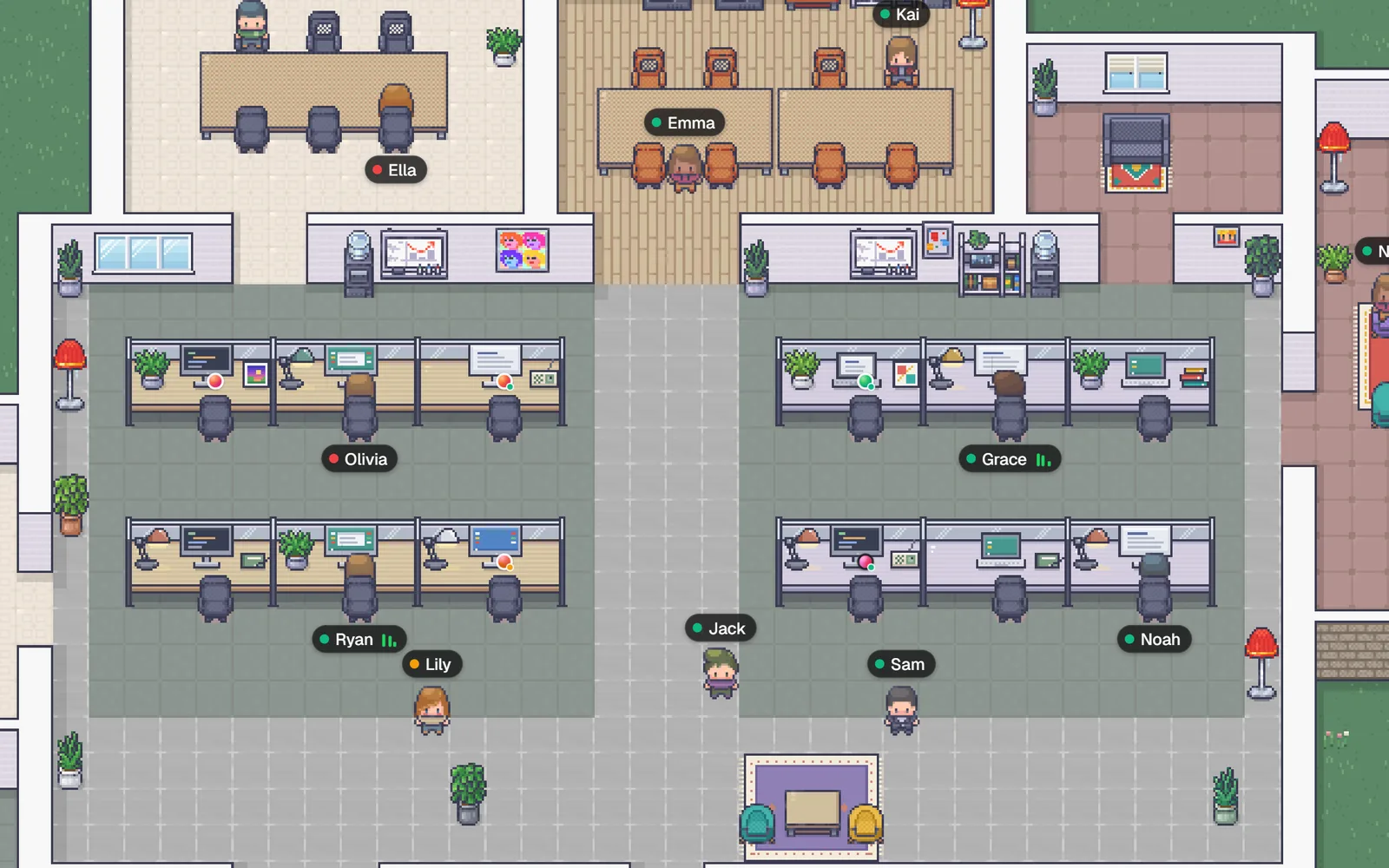
- Today
Olivia09:32
Morning! Launch is still on for 2pm, notes are in #design
Noah09:38
Jack09:46
Poster for the launch is done 🚀 what do you think?
 🚀3🔥2
🚀3🔥2
Lily is typing…
Message #general




Everything else a remote team needs.
Share your screen in any call and sketch it out on the whiteboard. Noise removal keeps the barking dog out of the call. Put your music on your card, leave a note under your name, keep a desk of your own, wave hello, and bring the office along on your phone.
- tinyfloor.com/i/northwindCopy
One link to invite
Paste it in your team chat. Teammates join with Google or an email code.
- HelloHolaOláBonjourHalloCiaoHejCześćHeiПриветこんにちは안녕하세요你好שלוםمرحبامرحباשלום你好안녕하세요こんにちはПриветHeiCześćHejCiaoHalloBonjourOláHolaHello
18 languages
Everyone uses TinyFloor in their own.
One price for the whole office.
One monthly price for the whole team, however many of you there are. Every new office starts with 14 days of Pro, no card needed, and up to 3 people can stay on Free.
- TinyFloor ProFree for up to 3 people
- $29a month
- Tools priced per person, at $8 to $16 each
- $80–$160a month

Open source. Private by default.
TinyFloor is an open source virtual office. Its code is public on GitHub, so anyone can read how it works and what it does with your team’s data.
- Open source
- Star on GitHub
- AGPL-3.0
Members only
An office is only for its members. Nothing inside it is public or indexed.
Encrypted calls
Calls and meetings are encrypted in transit, on any network.
Code you can read
See exactly what TinyFloor does with your team’s data.
Questions, answered.
What is TinyFloor?
TinyFloor is a virtual office you walk around in. Your team appears as pixel-art characters on a shared 2D floor, and a call starts when you stand next to someone instead of when you click a meeting link.
How does proximity video chat work?
Walk up to someone and a call button appears next to them. A tap starts a call, and once you're talking you can turn on your camera or share your screen. Calls run over WebRTC through Cloudflare's network, so they connect on any office or home network, and they stay up until someone hangs up. For a group, join a meeting and your character walks into the meeting room.
Is TinyFloor free?
Yes, for an office of up to 3 people, with everything included. After that, Pro is $29 a month for the whole team, not per person.
Do I need to install anything?
No. TinyFloor runs in the browser on desktop and mobile. Open your office's link and you are inside.
Do I need an account to join an office?
Yes, a free one. An office is private: teammates join through its invite link and sign in with Google or email. To look around first, the demo office needs only a name.
Is TinyFloor private and secure?
An office floor is only for its members, and nothing inside it is public or indexed by search engines. Calls are encrypted in transit by WebRTC, and your camera and microphone are only on during a call.
How is TinyFloor different from Zoom or Google Meet?
Zoom and Google Meet put everyone in one grid until the meeting ends. A TinyFloor office stays open all day, so you can see who's around, drift between conversations and talk to whoever you walk over to, without scheduling a call.
Still wondering? Try the demo office and see for yourself.
From the blog



Give your teama floor to share.
14 days of Pro for every new office · Runs on Cloudflare